The Web Console
6 minute read
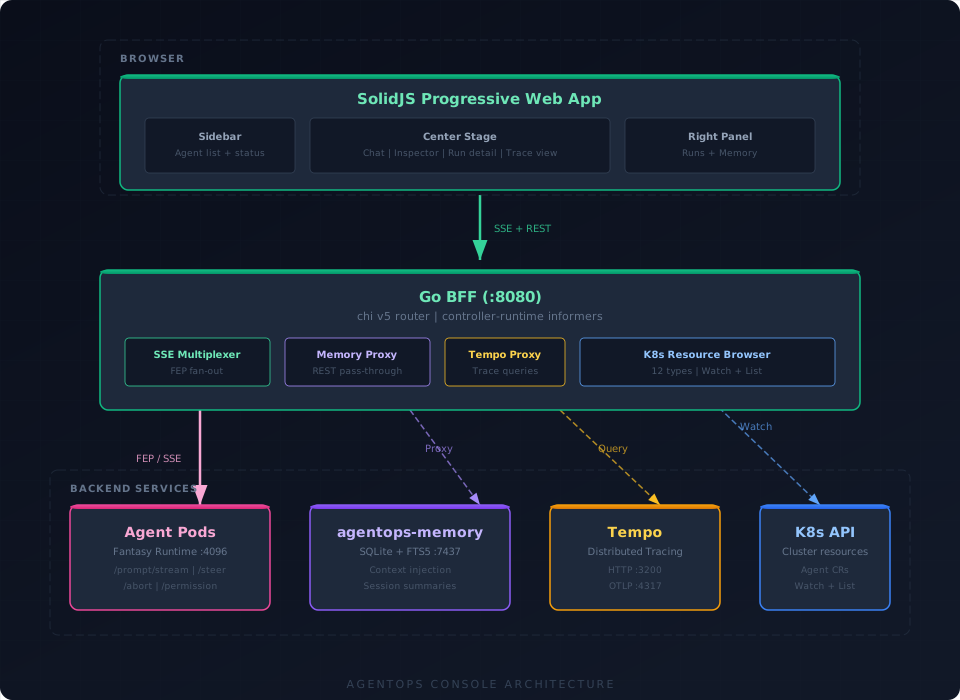
The AgentOps console is a progressive web app backed by a Go BFF (Backend-for-Frontend). It connects to agent runtimes via the Fantasy Event Protocol (FEP) over Server-Sent Events for real-time streaming of responses, tool calls, delegation events, and interactive controls.
Architecture
Tech stack
| Layer | Technology |
|---|---|
| Backend | Go, chi v5 router, controller-runtime informers for CRD access |
| Frontend | SolidJS 1.9, Vite 7, Tailwind 4 |
| Transport | REST (60+ endpoints) + SSE (FEP multiplexer) |
| PWA | Workbox service worker, offline-capable static assets, NetworkFirst API caching |
API surface
The BFF exposes 60+ endpoints under /api/v1, organized by domain:
Agents
| Method | Path | Description |
|---|---|---|
GET | /agents | List all agents across namespaces |
GET | /agents/{ns}/{name} | Get agent details |
GET | /agents/{ns}/{name}/status | Agent status (phase, model, tools) |
POST | /agents/{ns}/{name}/prompt | Send prompt (synchronous) |
POST | /agents/{ns}/{name}/stream | Send prompt (SSE stream) |
POST | /agents/{ns}/{name}/steer | Inject steering/system message mid-session |
DELETE | /agents/{ns}/{name}/abort | Abort current operation |
Conversations and working memory
| Method | Path | Description |
|---|---|---|
GET | /agents/{ns}/{name}/working-memory | Current session messages |
POST | /agents/{ns}/{name}/memory/extract | AI-assisted memory extraction from conversation |
Memory (proxied to agentops-memory)
| Method | Path | Description |
|---|---|---|
GET | /agents/{ns}/{name}/memory/observations | List all observations |
GET | /agents/{ns}/{name}/memory/observations/{obsId} | Get single observation |
POST | /agents/{ns}/{name}/memory/observations | Create observation |
PATCH | /agents/{ns}/{name}/memory/observations/{obsId} | Update observation |
DELETE | /agents/{ns}/{name}/memory/observations/{obsId} | Delete observation |
GET | /agents/{ns}/{name}/memory/search | FTS5 search across memories |
GET | /agents/{ns}/{name}/memory/context | Get injected context (same as runtime uses) |
GET | /agents/{ns}/{name}/memory/stats | Memory usage statistics |
GET | /agents/{ns}/{name}/memory/sessions | List session summaries |
GET | /agents/{ns}/{name}/memory/timeline | Chronological memory timeline |
Interactive control
| Method | Path | Description |
|---|---|---|
POST | /agents/{ns}/{name}/permission/{pid}/reply | Reply to permission gate (once/always/deny) |
POST | /agents/{ns}/{name}/question/{qid}/reply | Reply to interactive question |
Runs, CRDs, and resources
| Method | Path | Description |
|---|---|---|
GET | /agentruns | List all AgentRuns |
GET | /agentruns/{ns}/{name} | Get AgentRun details |
GET | /channels, /agenttools, /agentresources | Browse CRDs |
GET | /agents/{ns}/{name}/resources/{resName}/files | Browse repo files (GitHub/GitLab proxy) |
GET | /agents/{ns}/{name}/resources/{resName}/commits | Browse repo commits |
GET | /agents/{ns}/{name}/resources/{resName}/branches | List branches |
GET | /agents/{ns}/{name}/resources/{resName}/mergerequests | List MRs/PRs |
GET | /agents/{ns}/{name}/resources/{resName}/issues | List issues |
Traces and Kubernetes
| Method | Path | Description |
|---|---|---|
GET | /traces | Search traces in Tempo |
GET | /traces/{traceID} | Get trace detail (OTLP-to-Jaeger transform) |
GET | /kubernetes/browse/namespaces/{ns}/pods | List pods |
GET | /kubernetes/browse/namespaces/{ns}/deployments | List deployments |
| …and 10 more resource types | statefulsets, daemonsets, jobs, cronjobs, services, ingresses, configmaps, secrets (metadata only), events, namespace summaries |
SSE
| Method | Path | Description |
|---|---|---|
GET | /events | Global SSE stream (FEP events from all agents) |
GET | /watch | K8s resource change notifications |
Three-panel layout
The frontend uses a responsive three-panel layout:
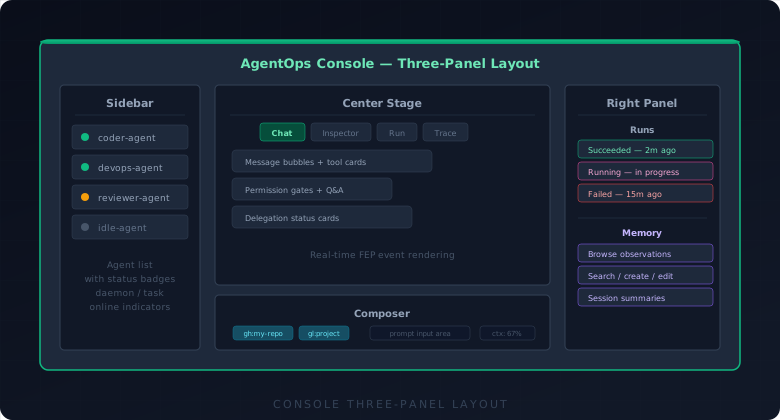
The center stage switches between:
- Chat — live agent conversation with message bubbles, tool cards, and interactive controls
- Agent inspector — agent configuration, tools, resources, and status detail
- Run detail — AgentRun output, metadata, and linked trace
- Trace detail — waterfall swimlane view with span detail panel
Tool card renderers
Tool results in the chat are rendered by 12 specialized card components, dispatched by metadata.ui hint or tool name:
| Card | Triggered by | What it renders |
|---|---|---|
TerminalCard | bash | Terminal-style output with command header |
DiffCard | edit | Unified or split diff view |
CodeCard | read | Syntax-highlighted file content |
FileTreeCard | glob, ls | Collapsible directory tree |
FileCreatedCard | write | Created file path with content preview |
SearchResultsCard | grep | Matched lines with file paths and line numbers |
WebFetchCard | fetch, webfetch | URL title, status, and content preview |
AgentRunCard | run_agent, get_agent_run | Run status, output, and linked trace |
DelegationFanOutCard | run_agents | Live progress of parallel delegation group |
KubernetesCard | MCP kubernetes tools | Resource table with status indicators |
HelmCard | MCP helm tools | Release info with chart/version |
GenericCard | Everything else | JSON tree viewer with collapsible structure |
Cards include category badges, branded watermark icons (for MCP tools), MCP transport indicators (inline vs. server), collapse/expand state persisted per-tool in localStorage, and duration badges.
Memory panel
The right panel includes a full memory management interface:
- Browse — paginated list of all observations with type badges
- Search — debounced FTS5 search with BM25 relevance ranking
- Create — manual observation creation (type, title, content)
- Edit — inline editing of existing observations
- Delete — with confirmation
- AI-assisted extraction — select conversation turns and extract observations via the runtime’s extraction endpoint
Observations display their type (decision, discovery, lesson_learned, bug_fix, preference, procedure, etc.), title, content preview, and timestamp.
Trace integration
The console’s trace viewer:
- Tempo proxy — the BFF fetches traces via Tempo’s HTTP API and transforms OTLP spans to a Jaeger-compatible format the frontend can render.
- Delegation tree enrichment — AgentRun CRDs are looked up by trace ID and used to build a parent/child delegation tree that overlays the span data.
- Tool call extraction —
tool.callevents recorded ongen_ai.generatespans are extracted and shown as virtual rows in the timeline. - Waterfall swimlane view — spans are grouped by service/agent into horizontal swimlanes, with duration bars and nested indentation.
- Span detail panel — clicking a span shows all attributes (with GenAI semantic conventions formatted for readability), events, and span links.
Theming
The console features a dual-engine theme system:
Vercel neutral mode
Clean, professional monochrome surfaces with a single accent color. No tonal palette derivation — the accent color is applied directly to interactive elements.
Material You (M3) mode
Full dynamic color generation from a seed color using @material/material-color-utilities:
- 9 scheme variants: Tonal Spot (default), Neutral, Vibrant, Expressive, Fidelity, Content, Monochrome, Rainbow, Fruit Salad
- 12 accent presets: Blue, Purple, Indigo, Green, Emerald, Orange, Amber, Pink, Rose, Cyan, Teal, Red — plus a custom color picker
- M3 surface container hierarchy: tinted surfaces, tonal containers, accent-derived backgrounds
- Dark/light/system mode with automatic detection
Theme selection, accent color, and scheme variant are persisted in localStorage.
Permission gates and interactive questions
When an agent encounters a tool that requires approval (listed in spec.permissionTools), the runtime emits a permission_asked FEP event. The console renders this inline in the chat as a permission card with three options:
- Allow once — approve this specific call
- Allow always — approve all future calls to this tool in this session
- Deny — reject the call
Interactive questions (question_asked events) render as single-select or multi-select cards with labeled options and descriptions. The agent blocks until the user responds.
Resource context system
The composer includes a resource context system for scoping prompts:
- Users can attach resource chips to the composer (files, commits, K8s objects) that provide additional context to the agent.
- Resources come from AgentResource CRs bound to the agent (
spec.resourceBindings). - The resource browser panel lets users navigate repository files, commits, branches, merge requests, and issues from GitHub and GitLab.
- A Kubernetes resource browser covers 12 resource types with namespace scoping.
Selected resources appear as chips above the prompt input, and their content is included as context when the prompt is sent.
AgentRun creation
The console can create AgentRun CRs directly from the UI:
- Select a target agent and enter a prompt.
- Optionally configure a git workspace (resource, branch, base branch).
- The BFF creates the AgentRun CR and the operator reconciles it.
- For task agents, this spawns a Job. For daemon agents, the prompt is delivered via HTTP POST.
- Run progress is tracked in the right panel’s runs list and updated in real-time via K8s watch events.
PWA capabilities
The console is built as a Progressive Web App:
- Workbox service worker — pre-caches static assets (JS, CSS, HTML) for offline access.
- NetworkFirst API caching — API responses are served from cache when offline, refreshed when online.
- Installable as a standalone app on desktop and mobile.